Keeping Agents on Track: Answering Questions About Data They Were Never Trained On
How AI assistants answer questions about data they were never trained on, and how designers keep them from drifting: retrieval-augmented generation, command-line and structured tools, MCP, and classification and routing, combined into a specialist assistant that finds the right data and stays in its lane.
A language model knows only what was in its training data, frozen at a cutoff date. It has never seen your order database, your policy manuals or last week's support tickets. Yet the most useful assistants answer exactly those questions.
They do it by moving the answer out of the model's memory and into its context. At question time, the system fetches the relevant facts, whether passages from documents, rows from a database, or output from a command, and puts them in front of the model. The model then reasons over evidence it can see, rather than recalling something it never learned.
That shift creates a second problem. A general-purpose model will happily answer anything, so an assistant built for insurance claims can drift into tax advice, guess when retrieval comes back empty, or hand the question to a generalist that has no access to the right data. Keeping an agent on track is a design job, not a property of the model.
This article covers the three building blocks that solve both problems, retrieval-augmented generation (RAG), command-line and structured tools (and the MCP standard that now packages them), and classification systems, and shows how designers combine them into a specialist assistant that finds the right data and stays in its lane.
How an agent actually answers
An agent answers from its context window, not from a database it can browse. Everything it knows about your data at the moment of answering is text that something placed in that window: the system prompt, the conversation, and the results of any tools it called.
The core mechanism is the agent loop:
- The model receives the system prompt, the user's question and a list of available tools, each with a name, a description and an input schema.
- It decides either to answer or to call a tool, emitting a structured request such as
search_policies(query="flood excess"). - The host application, not the model, executes that call against the real system and returns the result as text.
- The result is appended to the context and the model decides again: answer, or call another tool.
- The loop ends when the model produces a final answer or hits a step limit.
Three consequences matter for designers:
- The model only acts through tools you give it. It cannot query a table you have not exposed. This is your primary control surface.
- Tool descriptions are prompts. The model chooses tools by reading their descriptions, so vague descriptions produce vague tool choice.
- The context window is finite. Dumping an entire manual or a million-row table into it is impossible or wasteful; the art is fetching the few hundred lines that matter.
The three techniques that follow are different answers to one question: how do we get the right few hundred lines into the window, and only for questions this agent should answer?
RAG: retrieval-augmented generation for documents
RAG is the standard way to answer questions from a large body of unstructured text: manuals, contracts, wikis, tickets. Instead of training the model on the documents, you search them at question time and paste the best matches into the prompt.
Why not fine-tune the model on the documents instead? Fine-tuning is good at teaching style, format and domain behaviour, but poor at storing facts that change or must be cited. Retrieval keeps facts current, auditable and scoped to what each user may see. Many systems use both: a lightly tuned model for behaviour, retrieval for facts.
The pipeline
Indexing (done ahead of time):
- Load documents from their sources (PDFs, web pages, SharePoint, Confluence).
- Chunk them into passages, typically a few hundred tokens each, split on headings or paragraphs so each chunk makes sense alone.
- Enrich each chunk with metadata: source, section title, date, product line, access level.
- Embed each chunk into a vector, a list of numbers that places semantically similar text close together.
- Store vectors and metadata in a vector database or a search engine that supports vector fields.
Querying (done per question):
- Embed the user's question (or a rewritten version of it).
- Retrieve the nearest chunks, usually combined with keyword search (hybrid search) so exact terms like part numbers are not missed.
- Filter by metadata: only this customer's product, only documents the user may see.
- Rerank the candidates with a slower, more precise model (see below) and keep the top few.
- Put them in the prompt with an instruction to answer only from them and to cite them.
Where RAG goes wrong
| Failure | Symptom | Fix |
|---|---|---|
| Poor chunking | Answer cites half a table or a sentence out of context | Split on document structure; add section titles to each chunk |
| Unfamiliar or exact terms | Part numbers, clause IDs and in-house jargon embed poorly; keyword-only search misses synonyms such as "excess" vs "deductible" | Hybrid search (keywords + vectors), query rewriting |
| Wrong scope | Answer quotes a policy for the wrong country or product | Metadata filters chosen from the classified request |
| Empty or weak retrieval | Model fills the gap from general knowledge | Threshold on reranker score (below); instruct and test the "I couldn't find that" path |
| Stale index | Answer reflects last year's rules | Incremental re-indexing; show document dates |
A note on synonyms: embedding models place "excess" and "deductible" close together, because matching meaning rather than wording is what they are for. Vector search goes wrong elsewhere: on very short, ambiguous queries, on identifiers the model never learned, and on ranking, where the right passage scores just below an off-target one.
Rerankers and relevance thresholds
A reranker is a second-stage model that re-sorts the retrieval shortlist. First-stage embedding search (a bi-encoder) embeds the question and each passage separately, so passages can be indexed in advance and millions searched in milliseconds, but the model never reads the two together. A reranker (usually a cross-encoder) takes the question and one passage as a single input and scores how well that passage answers that question. It is far more accurate and far slower, so it scores only the top 50 to 100 candidates, and only the best 3 to 5 reach the prompt. An LLM can also play this role, at higher cost.
Rerankers also solve the threshold problem. Raw similarity scores are not comparable across queries: a vague question produces uniformly low scores even when the top hit is right, and a detailed one produces high scores for passages that do not answer it. So a single fixed cutoff on vector similarity works poorly. Better options:
- Threshold the reranker score, which is far more consistent across queries and often close to a probability of relevance.
- Use relative signals, such as the gap between the top result and the rest; a clear winner means more than a flat spread.
- Calibrate on labelled data, questions with known answers plus questions with none, and set thresholds per collection or per intent, so the router can pick the right one.
- Let a model grade relevance: a cheap call asks whether each passage actually answers the question and drops those that do not.
- Keep a check at the answer stage, because no threshold is perfect: the model must still say when the evidence does not answer the question.
Production systems typically combine 1 or 4 with 5, and treat raw vector similarity as a way to shortlist, not as a measure of confidence.
RAG as a tool rather than a pipeline
Early RAG systems retrieved once, before the model ran. Agentic RAG exposes search as a tool, search_docs(query, filters), so the model can reformulate, search again, or search a second collection when the first result is thin. This costs more calls but handles multi-part questions far better. Designers keep control by limiting which collections the tool can reach and which filters it must apply.
Beyond vector search
Some questions are about relationships or metrics rather than passages. Knowledge graphs (and GraphRAG, which builds a graph of entities and relations from documents) answer "which suppliers are linked to contracts with this clause?" better than chunk search. For numbers, a semantic layer, meaning agreed definitions of metrics such as "active customer" or "loss ratio", lets the agent query consistent figures instead of reinventing them in SQL each time.
Command-line and structured tools
RAG is built for prose. When the answer lives in structured data ("how many claims over $10,000 did we close in August?") similarity search is the wrong instrument. The agent needs to compute, and for that it needs tools that run real queries.
Three levels of tool
| Level | Example tool | Strength | Risk |
|---|---|---|---|
| Narrow function | get_order_status(order_id) | Predictable, easy to secure and test | Cannot answer questions you did not anticipate |
| Query language | run_sql(query) against a read-only replica | Answers open analytical questions | Wrong joins, slow queries, data exposure |
| Shell / command line | bash in a sandbox with grep, jq, awk, Python | Handles files, logs and messy formats; composes freely | Broadest attack and error surface; needs a sandbox |
Most production assistants mix levels: narrow functions for the frequent, high-stakes actions, and a query or shell tool for exploration.
Why the command line works so well
Models have read enormous amounts of shell usage, so they are fluent in it. A few standard commands cover a surprising share of document and data work:
grep -rn "force majeure" contracts/finds exact clauses across thousands of files, something vector search can miss.jq '.items[] | select(.status=="failed")' export.jsonfilters structured exports.ls,headandwclet the agent inspect a folder before deciding what to read, instead of loading everything.- A short Python script turns a CSV into totals the model would otherwise estimate badly.
This "let the agent explore" pattern often replaces a vector index for moderately sized document sets: the agent lists, greps and reads files on demand, the way a human analyst would.
Making data tools reliable
- Describe the schema. Give the model table and column descriptions, key relationships and a few example queries. Most SQL errors are schema misunderstandings.
- Use views, not raw tables. Expose curated, well-named views that already encode business rules ("active customer" defined once).
- Enforce limits in the tool, not the prompt. Read-only credentials, row limits, query timeouts, row-level security for the current user.
- Return errors as text. A clear error message lets the model fix its own query on the next turn.
- Sandbox the shell. No network by default, a scratch directory, an allowlist of commands where possible.
- Make the model compute, not recall. Instruct it to run arithmetic in code and quote the result, never to estimate from memory.
Standard protocols: MCP and agent-to-agent
The tools above no longer need to be hand-wired into each agent. The Model Context Protocol (MCP) is an open standard for connecting AI applications to tools, data sources and services: you wrap a database, a document index or a sandboxed shell once as an MCP server, and any MCP-capable agent can use it.
How MCP works
- An MCP server exposes three primitives: tools (actions the model can call, like
search_policies), resources (data it can read, like a file or a record) and prompts (reusable instruction templates). - An MCP client inside the agent's host application connects to servers, lists what they offer and passes tool definitions to the model.
- Messages use JSON-RPC 2.0 over two transports: stdio for local servers and Streamable HTTP for remote ones. Remote servers can use the spec's OAuth 2.1 authorization framework.
MCP was introduced by Anthropic in November 2024 and donated in December 2025 to the Agentic AI Foundation under the Linux Foundation, making it vendor-neutral. It changes quickly: the 2026-07-28 revision made the protocol stateless and deprecated older features such as Roots, Sampling and Logging. Designs should name the spec version they target.
MCP and keeping agents on track
| Concern | What MCP changes | Design response |
|---|---|---|
| Scope | Each agent's toolset is the set of servers it connects to | Connect each specialist only to its own servers; tool curation becomes configuration |
| Trust | Tool descriptions are written by the server's author and act as prompts | Vet, pin and version third-party servers; treat their output as untrusted data |
| Access | Identity and permissions can travel with each request | Enforce per-user access in the server, not the prompt |
| Governance | Requests carry method and tool information in standard HTTP metadata | Route traffic through an MCP gateway for access control, rate limits and logs |
| Tool overload | Connecting many servers can expose hundreds of tools | Load tools on demand (tool search), filtered by the classified intent |
Agent-to-agent protocols
MCP connects an agent to tools. Handoffs between agents built by different teams or vendors need a different standard. Agent-to-agent protocols such as Google's A2A let one agent discover another, describe a task and receive results. The routing principle from earlier still applies: a protocol makes handoffs possible, but your router decides which handoffs are allowed.
Classification and routing systems
Classification decides, before any expensive work, what a request is and who should handle it. It is the main lever for keeping an assistant on track, because a request that is correctly labelled can be sent to the right data, the right tools and the right specialist, or politely declined.
What gets classified
- Intent: what the user wants ("claim status", "coverage question", "file a complaint", "small talk").
- Domain and scope: is this inside the assistant's remit at all?
- Entities: policy numbers, product names, dates, which become retrieval filters and tool arguments.
- Risk: does it involve money movement, personal data, legal or medical advice, or signs of distress that need a human?
- Confidence: how sure the classifier is, which decides whether to proceed, ask a clarifying question or escalate.
Ways to build a classifier
| Approach | How it works | Best when |
|---|---|---|
| Rules and keywords | Regex or keyword lists | A few unambiguous, high-stakes triggers ("cancel my policy") |
| Embedding similarity | Compare the request to example utterances per intent | Many intents, cheap and fast, easy to update with examples |
| Small trained model | Fine-tuned classifier on labelled traffic | High volume, stable intents, labelled data available |
| LLM with structured output | A fast model returns {intent, domain, entities, confidence} against a fixed label set | New systems, nuanced language, little labelled data |
In practice, systems layer these: cheap rules first for hard triggers, an LLM classifier for everything else, and the labels logged so a trained model can take over once enough traffic exists.
The router
The classifier's output feeds a router, ordinary code, not a model, that maps each label to a handler:
- in-scope intents go to the matching specialist agent, with its own prompt, tools and data sources;
- out-of-scope but harmless requests get a short, friendly refusal that says what the assistant can help with;
- ambiguous or low-confidence requests get a clarifying question, not a guess;
- high-risk requests go to a human, or a constrained flow with confirmation steps.
Keeping the router as deterministic code matters. A model can suggest a label, but the decision about which tools and data a request may touch is enforced by software the model cannot talk its way around.
Keeping agents on track: the designer's levers
An agent drifts in three ways: it answers questions outside its specialism, it answers in-scope questions from general knowledge instead of your data, or it hands work to a generalist agent that lacks the right sources. Each lever below closes one or more of those gaps.
1. Scope the system prompt
State the role, the domain, the data it must use and what to do at the boundary. Concrete beats abstract:
You are the claims assistant for Acme Home Insurance. Answer only questions about Acme home policies and claims. Base every factual statement on results from
search_policiesorget_claim, and cite the document or claim ID. If the tools return nothing relevant, say you could not find it and offer to connect the user to an agent. For anything else (other insurers, tax, legal advice) say it is outside what you can help with and suggest where to go.
2. Curate the toolset
The tools an agent has define what it can do. A specialist should see only its specialist tools. Leaving a general web search or a "hand off to general assistant" tool in the list invites the model to use it whenever retrieval is hard. If a handoff is genuinely needed, make it a tool whose description states exactly when it applies.
3. Write tool descriptions as routing instructions
Descriptions steer tool choice. Say what the tool covers, what it does not, and when to prefer it: "Searches Acme home-insurance policy wordings, 2023 onward. Use for any question about coverage, exclusions or excess. Does not contain claim records; use get_claim for those."
4. Ground and verify answers
- Require citations to retrieved chunks or record IDs.
- Add a check step, a second model call or rule, that confirms each claim in the answer is supported by the retrieved text, and rewrites or blocks it if not.
- Treat "no evidence found" as a first-class answer, not a failure to paper over.
5. Control handoffs in code
In multi-agent systems, drift often happens at the handoff. Keep the decision to transfer in the router, pass the classified intent and entities along with the conversation, and do not let a specialist freely delegate to a generalist. A specialist that cannot help should return control to the router with a reason, not improvise.
6. Hold scope over long conversations
Users change topic. Re-classify each new turn (cheaply), so a claims conversation that turns to "what about my car insurance?" is recognised and routed rather than absorbed.
7. Enforce hard limits outside the model
Permissions, row-level security, read-only credentials, spending limits and confirmation steps belong in the tool layer. Prompts guide behaviour; infrastructure guarantees it. This also contains prompt injection: text inside a retrieved document that says "ignore your instructions" cannot grant access the tool never had.
8. Manage the context window
Long conversations and large tool results crowd out the system prompt and the evidence that matters, and scope instructions lose force as the window fills. Keep it lean:
- Trim tool output at the source: return the rows and fields needed, with a count of what was left out, not whole tables or documents.
- Summarise older turns and drop stale retrieval results once they have been used.
- Keep instructions and scope near the top and re-state the active intent when a conversation runs long.
- Use memory deliberately: store facts that should carry across sessions (a user's policy number, preferences) in a structured store the agent reads through a tool, rather than relying on an ever-growing transcript.
Putting it together: a reference architecture
The three techniques fit into one pipeline: classify first, route in code, then let a narrowly equipped specialist retrieve or compute its answer, and verify it before it reaches the user.
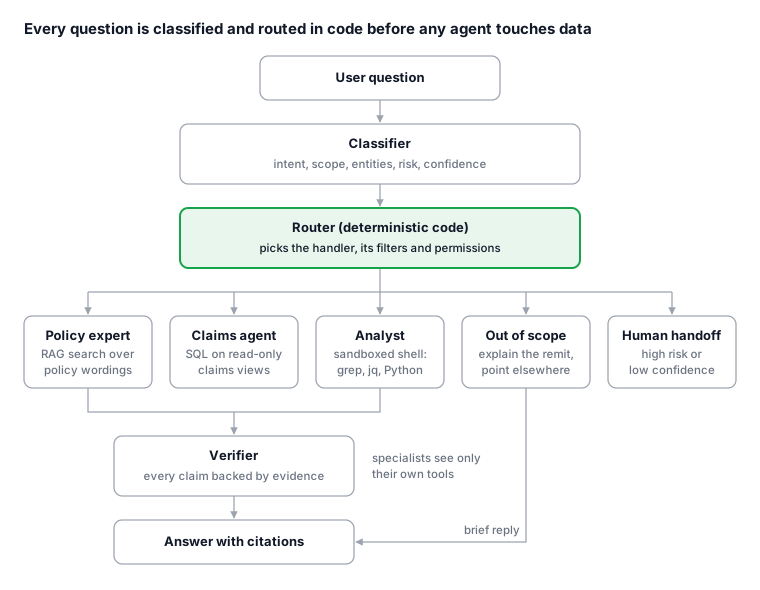
Only the three specialists touch data, each through its own tools; out-of-scope and high-risk requests never reach them.
Worked example: an insurance support assistant
Acme's assistant has three specialists behind one chat window:
| Specialist | Data | Tools |
|---|---|---|
| Policy expert | Policy wordings, FAQs | search_policies (hybrid RAG, filtered by product and region) |
| Claims agent | Claims database | get_claim(id), run_sql on read-only claims views |
| Analyst (staff only) | Claims exports, logs | Sandboxed bash with grep, jq, Python |
Question 1: "Does my home policy cover a burst pipe, and what's the excess?"
- The classifier returns intent
coverage_question, domainhome, entitypolicy HX-2231, confidence 0.93. - The router sends it to the policy expert and looks up the policy's product version and region.
- The specialist calls
search_policies("escape of water burst pipe excess", product=HomePlus-2025, region=VA), then a second search for "excess schedule" when the first result mentions an excess without stating it. - It drafts an answer citing both passages. The verifier confirms each sentence is supported; the answer goes out.
Question 2: "How many of my claims were paid last year, and how much in total?"
- Classified as
claims_history, routed to the claims agent. - The agent writes a SQL query against the
customer_claimsview; row-level security limits it to this customer. - The database returns three rows and a total; the agent reports the figures it was given, not an estimate.
Question 3: "Can you help me with my tax return?"
- Classified as out of scope with high confidence.
- The router never invokes a specialist. The user gets a one-line explanation of what the assistant covers and a pointer elsewhere.
Question 4: "This is ridiculous, I want to cancel everything."
- Rules flag
cancellationand negative sentiment as high risk. - The router hands the conversation to a human retention agent with the transcript and detected entities attached.
No question reached a generalist model with no data, and every factual answer came from a retrieved document or a query result.
Evaluation and failure modes
An assistant stays on track only if you measure whether it does. Evaluate each layer separately, so a bad answer can be traced to the step that caused it.
| Layer | What to measure | How |
|---|---|---|
| Classifier | Accuracy per intent; out-of-scope recall | Labelled test set drawn from real traffic, including off-topic and adversarial requests |
| Retrieval | Did the right chunk appear in the top results? | Question-source pairs; recall@k and reranker precision |
| Tools | Query correctness, error rate, latency | Known-answer SQL questions; replay logged tool calls |
| Answer | Faithfulness to evidence, citation accuracy, refusal quality | Model-graded rubrics checked against human spot reviews |
| End to end | Resolution rate, escalations, user corrections | Production monitoring and sampled transcript review |
Common failure patterns to test for explicitly:
- Confident gap-filling: retrieval returns nothing useful and the model answers anyway. Test with questions whose answers are deliberately absent.
- Scope creep: plausible adjacent questions ("what about car insurance?") get answered from general knowledge.
- Handoff leakage: a specialist delegates to a generalist when a query is hard.
- Topic drift mid-conversation: turn one is in scope, turn five is not, and no re-classification happens.
- Injected instructions: a document or record contains text telling the agent to change behaviour.
- Silent staleness: the index or schema changed and answers quietly degraded.
Observability makes this possible. Trace every request end to end: the classifier's label and confidence, the route taken, each retrieval query with its scores, every tool call with its arguments and result, and the verifier's verdict. When an answer drifts, the trace shows which step caused it (wrong label, weak retrieval, bad query or unsupported claim) and turns a vague complaint into a specific fix. Traces also supply fresh cases for the test sets above.
Keep a regression suite of these cases and run it on every change to prompts, tools, models or indexes.
Conclusion
Agents answer questions about unseen data by fetching evidence into their context at question time: RAG for documents, query and command-line tools for structured data and files. Keeping them on track is a matter of design, not trust. Classify every request, route it in code, give each specialist only the tools and data its job needs, require answers grounded in what was retrieved, and enforce hard limits in the infrastructure.
Built this way, an assistant does not need to know everything. It needs to recognise what it is being asked, know where the answer lives, and say plainly when a question belongs somewhere else.
Sources
Related reading
Sample brief: An open-weights model release, and what to look for in the fine print
A placeholder industry-news brief showing the short format: what happened, why it matters for people, and where to read the primary sources.
Sample analysis: Reading an AI funding round, a worked example
A placeholder financial-analysis piece that walks through a hypothetical funding announcement and shows how to read the numbers behind the headline.